When a new client signs, a surprising number of activities happen behind the scenes.
The problem?
Many businesses still perform these tasks manually.
The result is wasted time, inconsistent experiences, and unnecessary operational friction.
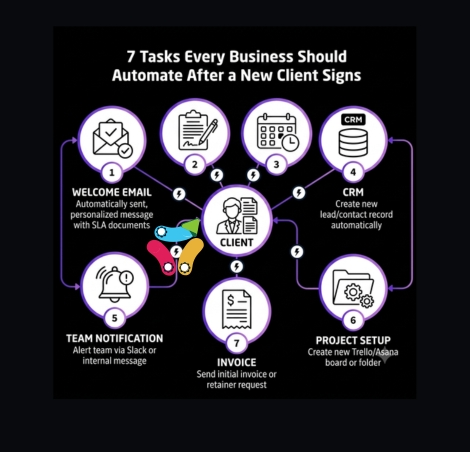
Here are seven tasks that are often ideal candidates for automation.
1. Send the Welcome Email
Every new client should receive a timely welcome message.
Instead of sending emails manually, create a workflow that delivers the right information immediately.
2. Generate Onboarding Documents
Contracts, questionnaires, welcome packages, and onboarding forms can often be prepared automatically using client information already collected during the sales process.
3. Create Client Folders
Whether you use Google Drive, SharePoint, Dropbox, or another platform, client folders can be created automatically with a consistent structure.
4. Update CRM Records
Many teams still manually update customer records after a deal closes.
Automated workflows ensure information remains accurate and consistent.
5. Notify Internal Teams
Sales, operations, delivery, and support teams often need visibility when a new client signs.
Automation ensures everyone receives the information they need immediately.
6. Schedule Next Steps
Kickoff meetings, onboarding sessions, and project reviews can often be triggered automatically, reducing delays and back-and-forth communication.
7. Update Internal Reporting
Sales trackers, forecasting spreadsheets, dashboards, and operational reports should update automatically whenever possible.
Why These Seven Tasks Matter
None of these activities create competitive advantage.
They’re important.
But they’re repetitive.
Which makes them excellent candidates for automation.
Save Human Time for Human Work
Automation works best when it handles routine administrative tasks.
Your team should spend their time:
- Building relationships
- Solving problems
- Serving customers
- Growing the business
Not copying information between systems.
The best onboarding experience isn’t the one with the most automation.
It’s the one where clients feel supported while your team spends less time on repetitive work.
What Happens After a Client Signs?
If your onboarding process still relies heavily on manual effort, there may be opportunities to save time using the tools you already have.
A Workflow Audit helps identify exactly where those opportunities exist.